Pharos: export customs declarations under control
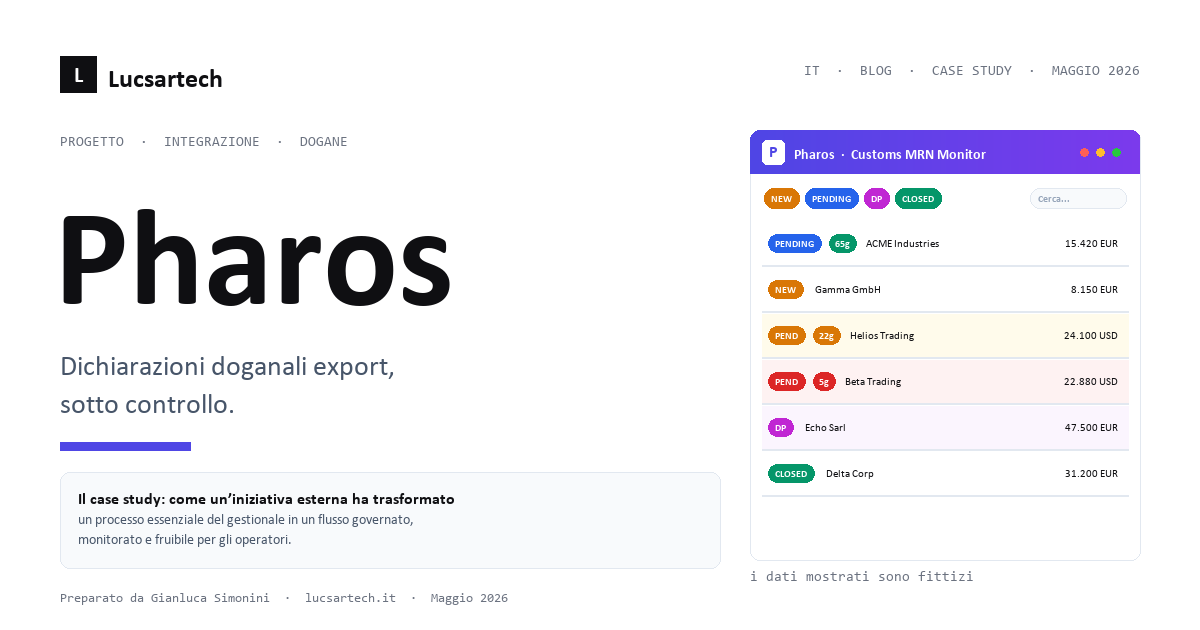
Pharos: export customs declarations under control
The problem, in two lines
For an Italian exporter, every shipment outside the EU generates a customs declaration identified by an MRN (Movement Reference Number). From that moment, a countdown begins: within 90 days, the Italian Customs Agency must confirm the physical exit of the goods with an exit certification. If this does not happen, VAT and accounting implications kick in — implications that, at scale, can reach seven-figure amounts.
In many companies, this tracking process is still a shared Excel sheet, a few phone calls to the customs broker, and a manual weekly check. Pharos was built to change that.
The context
An international group in the food and beverage industry, with a strong export focus, asked us for help with a critical process: reliably tracking the status of every MRN from invoice to customs closure, triggering document recovery when the visa does not arrive, and archiving proof PDFs inside the existing ERP — without forcing the operator to adopt new habits.
The technical constraints were clear: - the ERP is the source of truth: no parallel repositories, declarations must remain visible there - integration with the Customs Agency runs over a SOAP web service with a daily quota - authentication must use corporate Active Directory — no separate accounts - the IT team is internal: the solution must be maintainable by a standard Java team, no exotic frameworks
The solution: Pharos
Pharos is a Java 17 application that runs alongside the ERP, in two concurrent modes:
- A batch process that — every N hours (a configuration parameter) — automatically queries the Customs Agency for open declarations, downloads the closure document when available, and updates the declaration status in the ERP.
- A web dashboard where operators see all declarations in real time, the status of each, deadlines as a traffic light (green / yellow / red / overdue), and can manually upload the MRN, customs attachments, and supporting documents when the visa is delayed.
The operator sees a single screen. They filter by status, search by customer or invoice number, export to Excel, download proof PDFs, upload new documents. That's it.
Six states, one workflow
A declaration goes through up to six states, each with a color and a clear operational action:
- To generate — invoice exists but no MRN declaration yet: we create it
- To upload — declaration created, MRN number missing
- Pending — MRN registered, waiting for Customs to issue the exit visa
- Supporting docs pending — the visa is late; the operator has uploaded the supporting documents (CMR, proof of delivery, etc.) to close the declaration through an alternative route
- Supporting docs closed — the visa arrives after the supporting-documents phase
- Closed — declaration normally closed
All transition logic is derived from two fields that already existed in the ERP: no new state tables, no replicated state machines. The source of truth remains the ERP.
Three technical details we're proud of
1. Audit trail on every web service call
The Customs Agency enforces a daily quota of queries: exceeding it means a temporary block. Pharos writes a log record for every web service call — success, error, no-op — over a separate auto-commit connection, so the log is never impacted by application rollbacks. The daily counter is a simple query on the audit trail, and the current-year count is shown on the metrics page.
2. Atomic transaction on closure
When the exit visa arrives, Pharos performs three operations in one transaction on the ERP: it writes the attachment metadata, saves the PDF binary, and updates the declaration status. Commit per record, rollback on any error. A single corrupted record never blocks the batch: the next declaration starts fresh.
3. XML rendered as HTML
Italian electronic invoices are XMLs that the human eye cannot easily parse. Pharos applies the official stylesheet from the Italian Revenue Agency (XSLT) on the fly to render them as printable HTML: the operator clicks the paperclip icon and sees the invoice as on the SDI portal — without downloading anything.
Architecture, on one page
- Java 17 + Maven, self-contained fat JAR
- Plain JDBC on Oracle (no ORM): we are guests of the ERP's database, we write readable SQL
- SAAJ for SOAP, built by hand (no WSDL codegen)
com.sun.net.httpserverfor the web UI (zero application server)- Bootstrap 5.3 via CDN for the dashboard (zero frontend build)
- Jakarta Mail for notifications
- JNDI / LDAP for corporate AD authentication
- Logback with daily rotation, Prometheus endpoint for monitoring
Three megabytes of code, one JAR, one configuration file, one command to launch it. Zero containers, zero application servers. It runs on a RHEL 6 VM just as well as anywhere else.
Operational results
After going into production:
- Zero forgotten declarations. The traffic light forces regularization before the legal threshold.
- ~95% automatic closures. Operators only step in on cases that are running late.
- Full traceability. Every call, every upload, every user is logged. In the event of a tax audit, supporting documentation can be reconstructed immediately.
- Immediate adoption. One screen, six colored states: training is over in half an hour.
What we take away
Three lessons we'll apply to the next similar case:
- Stay inside the customer's source of truth, don't build a parallel one. The dashboard is just a view; the source remains the ERP.
- Parameterize everything that is subject to regulation: thresholds, polling cadence, lists of mandatory documents. Customs rules change: the code shouldn't.
- Audit trail = product feature, not a debug log. It's what saves the customer during inspections.
We work on mission-critical processes at the intersection of regulation, legacy systems, and daily operations. If you have a similar case, let's talk.
Want us to reach out?
If you want to see how ERPNext can solve the challenges described in this article, book a dedicated demo.
Other articles
Claude — And Just Like That, You're a Developer
There was a time when all it took was a slogan. Buy this, and just like that, you're someone else. Drink that coffee and you're already a man of the world, wear those shoes and you run like a champion
When Safety Becomes the Enemy: The Paradox of the 5 Divers in the Maldives
I can't forget the news. Five professional divers, dead during a dive in the Maldives waters. People who knew exactly what they were doing. Certified. Experts. Dead.
Beyond control: observe, understand, prevent
Many monitoring tools are limited to saying “up” or “down.” Useful, of course—but a bit like discovering you have a fever only once you’re already stuck in bed.
Switching from proprietary ERP to ERPNext: why more and more companies are choosing open source
In today's ERP market, many companies are rethinking their relationship with traditional proprietary systems. High costs, technological lock-in, difficult-to-maintain customizations, and opaque roadma